
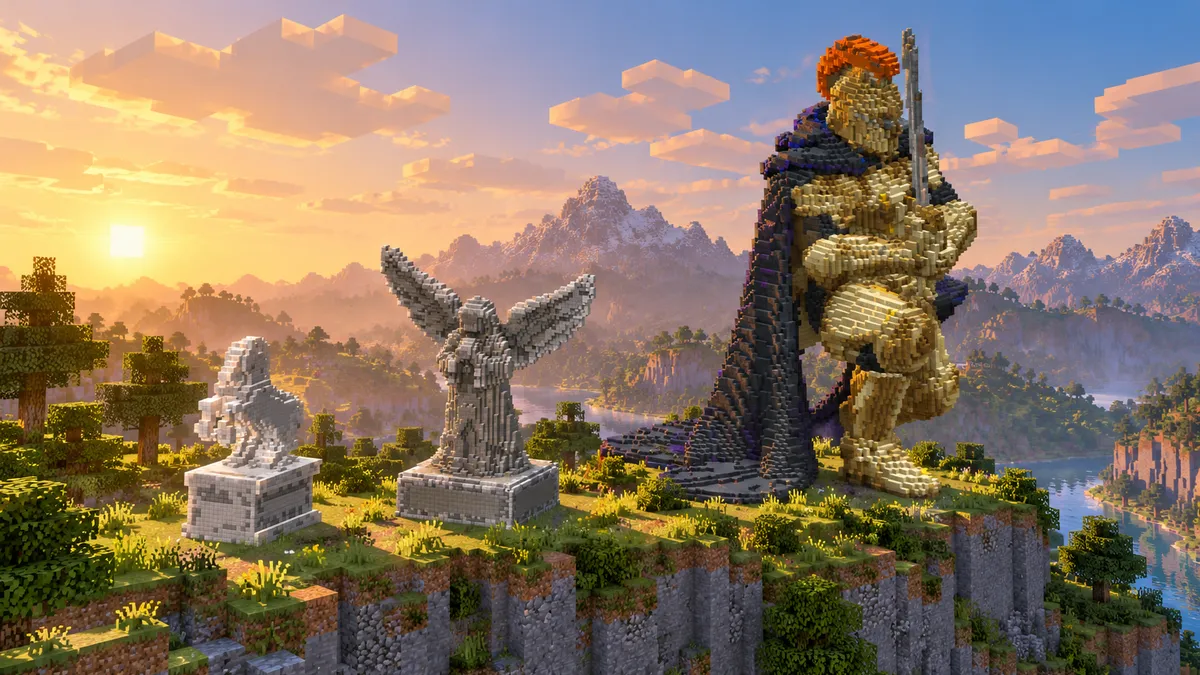
Look up how to make a statue in Minecraft and you find two kinds of answer. One is a tool that turns a player skin into a statue. The other is a list of steps that begins with crafting a chisel, which vanilla Minecraft does not have: chisels come from mods. A statue in the plain game is ordinary blocks, placed one layer at a time, and it can be of anything. The three below were measured block by block.
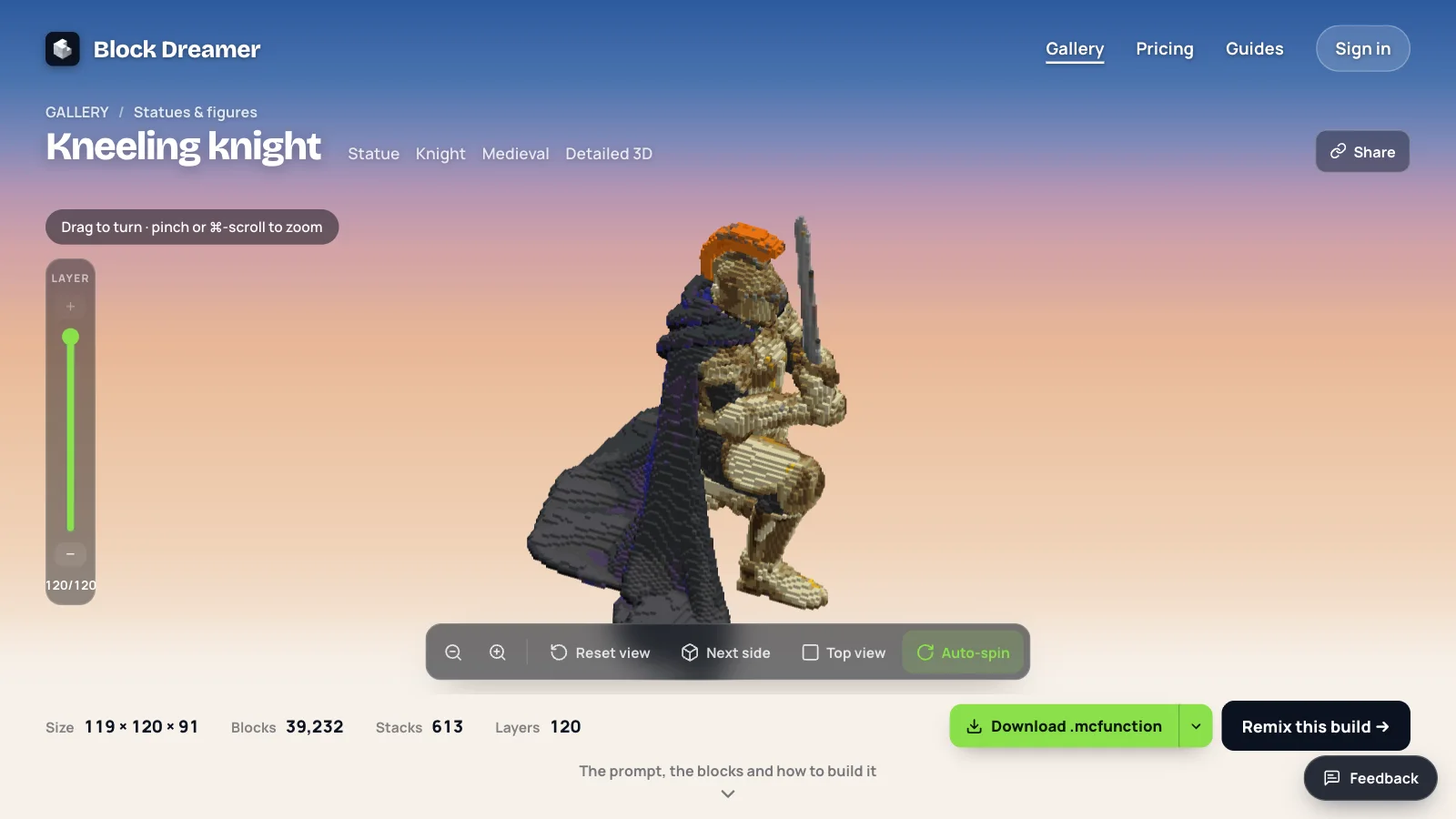
TL;DR: Decide the height first, because it decides everything else. At 48 blocks a rearing horse is a blunt shape (2,681 blocks), at 80 an angel's wings and robe read clearly (7,992 blocks), and at 120 a knight has armour, a cape and a plume (39,232 blocks). Build the statue as a hollow shell, from the feet up.
1. Decide the height before anything else
| Rearing horse | Angel | Kneeling knight | |
|---|---|---|---|
| Height | 48 | 80 | 120 |
| Size (width × height × depth) | 17 × 48 × 28 | 63 × 80 × 33 | 119 × 120 × 91 |
| Blocks | 2,681 | 7,992 | 39,232 |
| Stacks of 64 | 42 | 125 | 613 |
| Kinds of block | 6 | 11 | 42 |
| What you can make out | The pose, bluntly | Wings, robe, bowed head | Armour plates, cape, plume, sword |
At 48 blocks tall the horse, 17 × 48 × 28, takes 2,681 blocks, 42 stacks. The angel, 80 tall and 63 × 80 × 33, takes 7,992 blocks or 125 stacks, and the 120-block knight (119 × 120 × 91) takes 39,232, 613 stacks.
All three were made by Block Dreamer, an AI Minecraft build generator that turns a text description into one Java 1.21 build (a statue, a creature or a building) with a 3D preview, a layer plan, a block list and downloads for vanilla (.mcfunction), WorldEdit (.schem) and Litematica (.litematic), plus its block data as JSON; it makes one structure per prompt, or with Mega one place built in parts (a village, a castle with its grounds), and not whole cities or landscapes. We made the horse and the angel for this page on 5 October 2026. The knight is in the gallery.
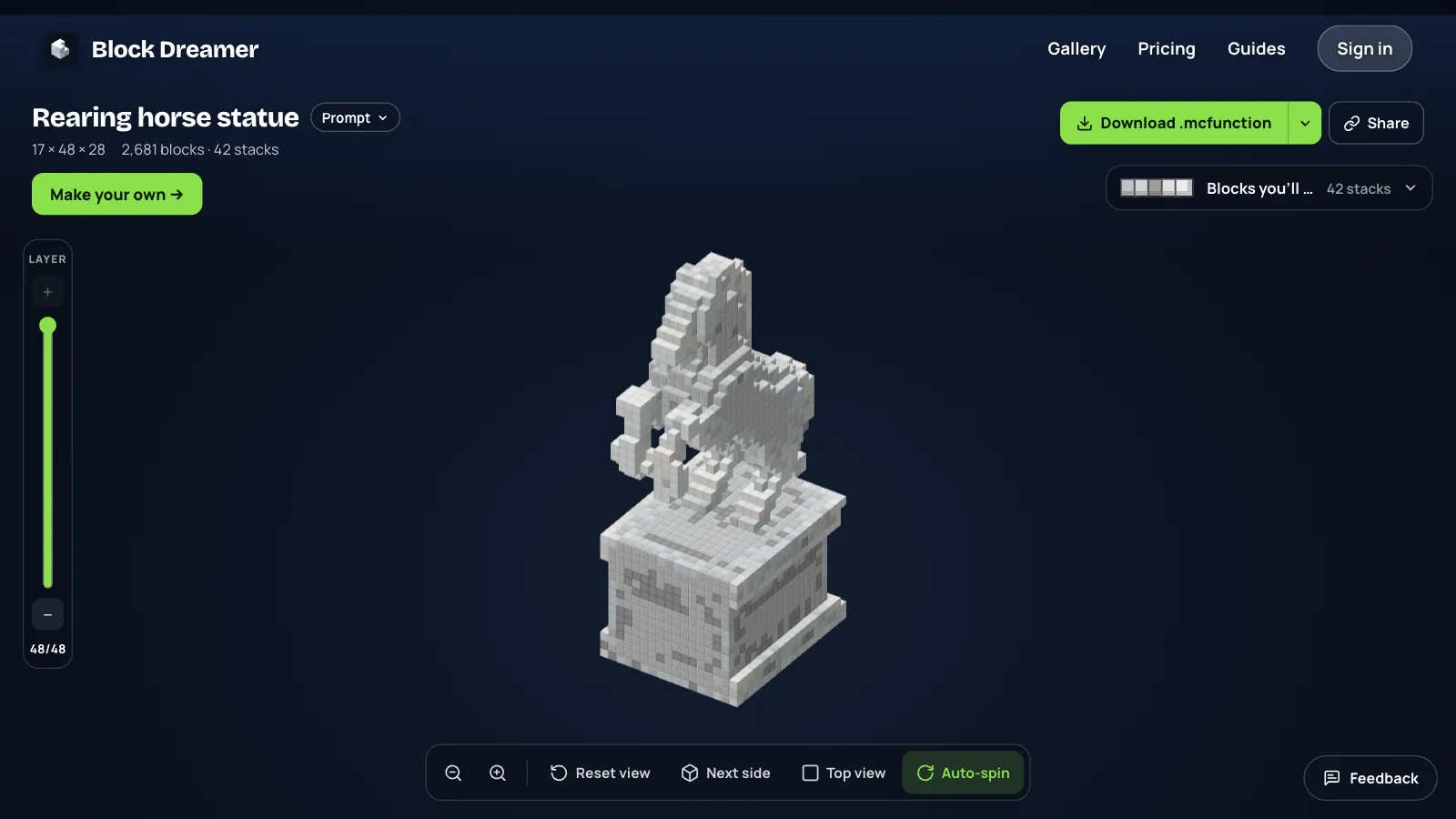
At 48 blocks you get a pose. The horse has a body, a neck, a head and two raised forelegs, and nothing finer than that. At 80 the angel's wings have ribs and the robe has folds, but there is still no face: the head is a smooth bowed shape. The knight's helmet, at 120, is the first of the three where a head has parts.
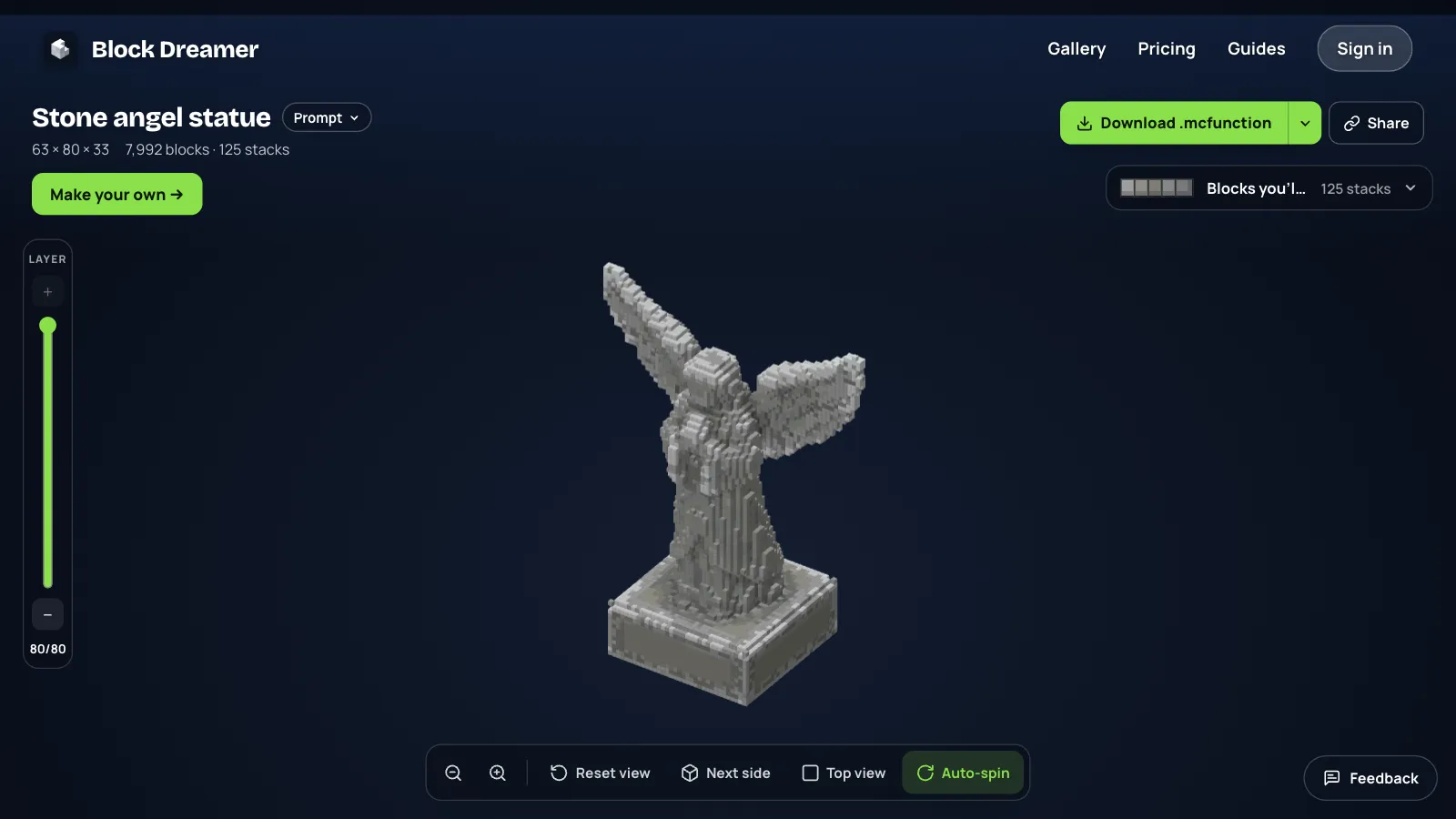
Blocks grow much faster than height. From the horse to the angel the height is 1.7 times and the blocks are 3 times. So pick the smallest height that shows the detail you care about, not the largest you can imagine.
2. Choose the plinth on purpose
A plinth uses up height, and at small sizes it uses up most of the statue.
We asked for the horse "on a square stone plinth". The plinth took the bottom 15 of the 48 layers and 1,500 of the 2,681 blocks. That left a horse 33 blocks tall, which is why it looks blunt. The angel's plinth took 13 of 80 layers and 3,201 of 7,992 blocks, and the figure still had 67 layers to itself.
A plinth is a box, and a box is the easiest thing in Minecraft to build by hand. For a small statue, ask for no plinth, give the whole height to the figure, and stack a base under it yourself afterwards.
3. Pick a palette of one colour family
A stone statue does not need many blocks. The horse uses six, all white: 1,425 polished diorite, 528 white concrete, 313 smooth stone, 197 calcite, 139 white wool and 79 quartz. Mixing near-matching blocks is what gives the surface its shading; one block alone would look flat.
The angel uses eleven greys, led by smooth stone (1,544), light gray wool (1,502), light gray concrete (1,307), polished andesite (996) and stone bricks (870). If you build in survival, swap the wool for a stone of the same shade. Wool burns.
Colour multiplies the list. The knight takes 42 kinds of block, and its gold armour is not gold at all: it is 6,772 spruce planks and 2,958 birch planks. The cape is deepslate tiles and deepslate. Blocks are chosen for their colour, so read the block list before you gather.
4. Build a hollow shell, from the feet up
A statue is a skin one block thick with nothing inside. That is what keeps an 80-block angel under 8,000 blocks.
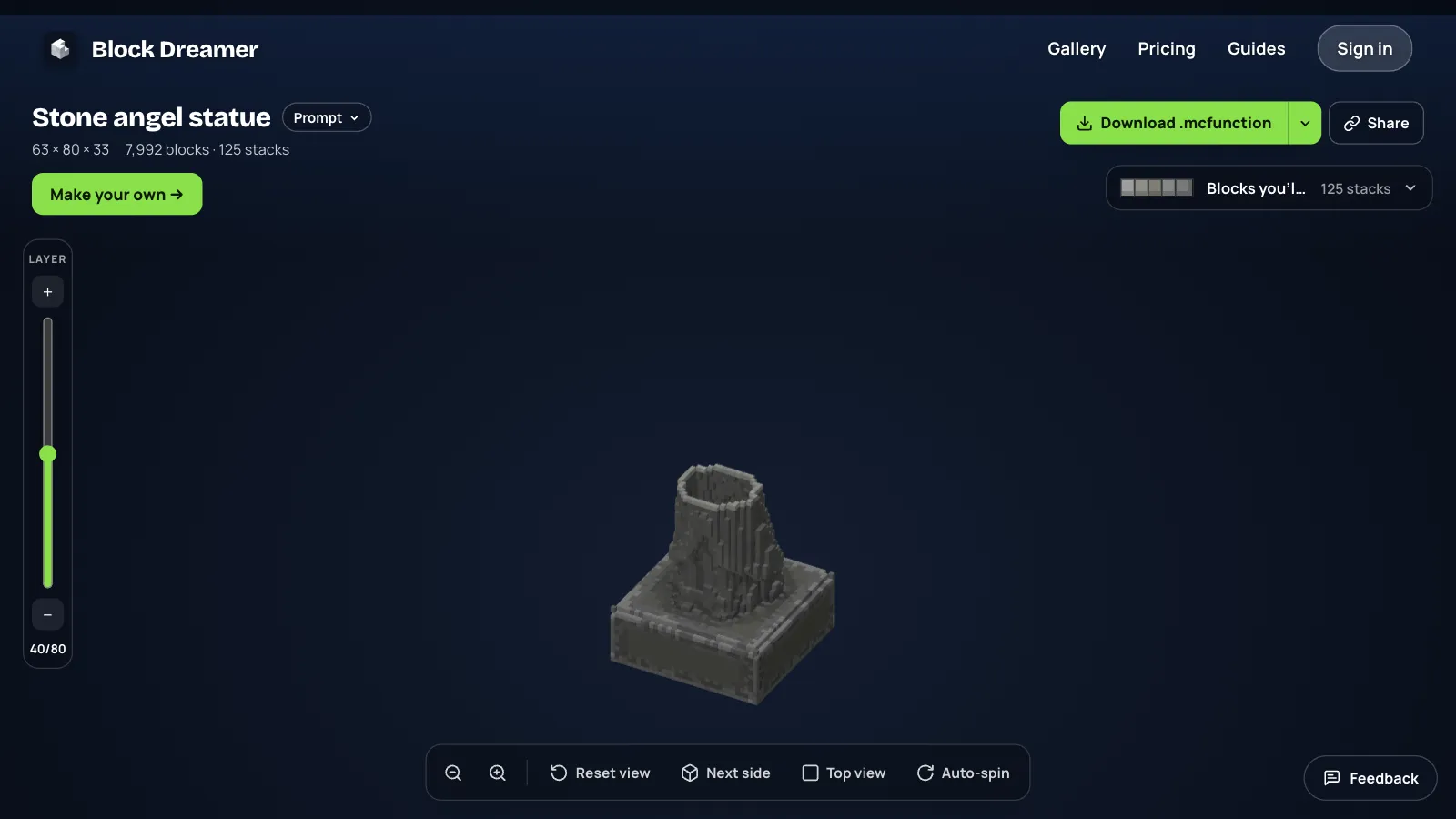
Work one layer at a time. Through the angel's robe a layer is a ring of 40 to 70 blocks; across the wings it is 80 to 125. Place the ring, step up, place the next. The layer slider on the build shows each ring on its own, and Litematica will show it as ghost blocks in your world so you only fill them in.
5. Or have it carved from a sentence
You don't have to work out the rings yourself. Type what the statue is, and the generator draws it, turns the drawing into a 3D model and cuts the model into blocks.
- Say what, how and of what. Our two sentences were "a rearing horse statue in white stone on a square stone plinth" (open it to edit) and "a stone angel statue with wings spread and hands together, standing on a plinth" (open it to edit).
- Leave "How it's made" on Detailed 3D. It is the one that carves. Classic builds from parts like walls and roofs, which suits buildings.
- Set the size. Small is 48 blocks on the longest side, Medium is 80 and Large, the default, is 120. A size written in the sentence is followed instead.
The horse took 72 seconds and the angel a little over five minutes. A carved build costs 2 credits, and your first build is free with an account. There is also Premium (5 credits), whose 3D model comes from a heavier service; we made both statues here without it.
The knight came from this sentence: "A colossal knight statue kneeling with a greatsword, shining gold armor with a royal blue cape and a red plume on the helmet". You can open the kneeling knight in the gallery and cut through it without spending a build.
6. Place it in your world
There are five downloads. Two are vanilla function files, which paste the statue with one command and no mods. WorldEdit takes the .schem. Litematica takes the .litematic and guides you block by block, which is the survival way. How the generator builds covers each one and when to use it.
On Bedrock none of the files can be pasted, so follow the layer plan by hand.
Statue ideas by size
We made two statues for this page. These are subjects we would try at each size; we have not built them here, so treat them as a starting point:
- At 48: an owl, a chess knight, a moai head, a sword in a stone. Plain outlines with no thin parts.
- At 80: a dragon curled on a rock, a mermaid, a wizard with a staff, a guardian for a castle gate. Wings, robes and tails read well.
- At 120: an armoured warrior, a phoenix, a giant holding a lantern. The gallery's rising phoenix and mountain dragon are both 120 on their longest side.
What goes wrong
Faces are the first thing to go. Neither the horse nor the angel has one you can read. At these sizes, ask for a helmet, a hood or a mask and nothing looks missing. A statue made from a player skin does have a face at 32 blocks tall, because the skin's face is drawn 8 by 8 pixels and each pixel becomes a block (Minecraft Maps' skin statue generator, read 14 October 2026); a carved statue has no drawn face to copy.
Thin parts thicken. The horse's forelegs are stubs, and a sword or a staff comes out several blocks wide.
The generator works from a description: it doesn't take a picture or a skin, so a statue of your own character has to be described in words. If you already have a 3D model of it, a free converter such as ObjToSchematic turns the model into a .schem or .litematic directly; Block Dreamer is for when all you have is the sentence.
A carved statue is hollow and has no inside to walk into. Our two were made without the second look that Pro and Studio plans add, where a second model looks at the finished build and may try another version. And these were two runs on one machine: your timings will differ.
If you know the subject and the height, you know most of the statue already. Describe yours and see what the first one looks like.